Constructability · Clash detection
Clash detection: 5 conflicts the 3D model won't show
A clash-free 3D model is standard today. It does not tell you whether the construction process works: five conflicts that only show up over time.
 Michaela Schlichting
Clash detection for the construction process answers the question the 3D model leaves open: whether every process has the space, time, and access it needs at the planned moment. A clash-free model is standard today. It shows the target state, not how you get there. Here are five conflicts that only show up over time, and how to find them before work starts.
Where clash detection in the model stops
Classic clash detection checks whether objects in the 3D model overlap or violate minimum clearances. It catches conflicts between components, utilities, and systems early. Its limit is reached as soon as time and construction processes come into play.
An example: an excavator is scheduled for earthworks. The model shows enough room. At the planned time, however, stored material blocks the access road. The design is geometrically correct, but the process cannot be carried out as planned.
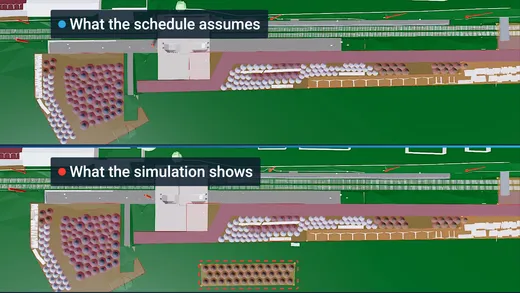
Work planning covers site setup, crane positions, equipment, schedule, and logistics. These checks are essential, but they often happen in isolation. The site layout plan shows where storage areas are, the schedule shows when work takes place. Neither shows whether an area is already occupied at a given moment.
Five construction process conflicts the model won't show
The examples come from rail construction. The patterns apply to any complex site.
1. Equipment can't reach its work area
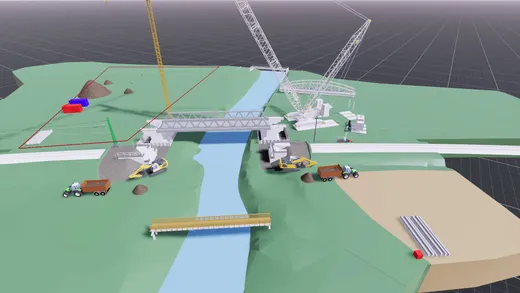
A road-rail excavator needs to reach a section of track. At that moment, though, parked equipment or material transports block the access. Equipment and structure are modeled correctly; the conflict only arises from the sequence. The result: crews and machines sit idle, and equipment has to be moved again.
2. Areas are booked twice
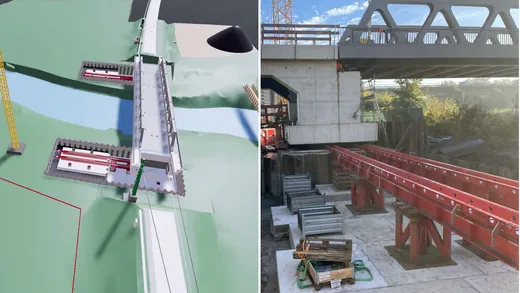
At a railway bridge, an area is needed for pre-assembly while excavated soil is due to be stockpiled there at the same time. Both uses work, just not at once. The result: material is moved at short notice, extra transports are needed, and assembly is delayed.
Jonas Wolpold, Managing Director of BII, described what this looks like on a real project at InnoTrans 2026 (video in German): during a 55-hour track possession, a vehicle had to take a detour to reach the site setup area.
3. Parallel trades get in each other's way
Overhead line work is underway in the track area while other trades are due to work in the same zone. Each job is feasible on its own. Together, safety clearances, required power shutdowns, and work zones collide. The result: trades are interrupted, work steps are pushed back, and the schedule gets longer.
4. The time window is too short
A turnout replacement has to fit into a limited track possession. On the schedule, everything fits. But setup times, equipment changes, and material transports are not fully accounted for, and the sequence overruns the possession. The result: additional possessions, high standby costs, and a later commissioning date (see track possession planning).
5. The logistics chain breaks down
During track renewal, old ballast has to be hauled away while new material is delivered. The haul routes can't handle both flows at once. The result: trucks wait, machines stand still, and material is missing where it is needed.
The process is rarely the problem. Its prerequisites are.
Time conflicts usually carry the biggest financial impact, especially when a track possession overruns or commissioning slips. In our process engineering experience, though, logistics and space are the most often underestimated. The actual construction work is usually planned in detail. Transports, stockpiles, equipment changes, and temporary areas often are not.
The construction process itself is not always the problem. Often it's the prerequisites needed to carry it out at all.Marlon Gilfert, COO & Head of Process Engineering
Example: 447 construction activities, systematically checked
For a rail construction company, BII examined 447 construction activities for conflicts in the process. For 146 of them, no clash was apparent. 176 activities were blocked because a joint venture partner was occupying the tracks at the same time. For 38, the analysis found suspected clashes, and another 87 possible clashes still need to be discussed with the parties involved.
The numbers do not show confirmed clashes. They show where a closer look is needed: only about a third of the activities came back without findings. The largest group is not geometric clashes at all, but conflicts over the same tracks at the same time. Jonas Wolpold describes a similar pattern: projects often ask BII to check “just this one thing,” and two weeks later there are 20 clashes on the table.
How to find these conflicts before work starts
A construction process simulation brings together information that usually sits in separate places:
- 3D as-built and design models
- Schedules and phasing plans
- Construction methods and equipment with productivity data
- Site logistics with haul routes, quantities, and storage areas
- Constraints such as track possessions and access
A conflict becomes visible when two processes claim the same resources at the same time, work zones are missing, or dependencies can't be met. Not every conflict can be detected automatically. Assessing logistics bottlenecks or construction methods takes construction engineering expertise.
Finding a conflict is only the start. The team adjusts sequence, logistics, areas, or equipment, and the process is simulated again. That shows whether the fix holds across the whole process. Unexpected ground conditions, breakdowns, or weather remain unpredictable: simulation does not guarantee a disruption-free process, but it reduces planning risk.
Bottom line: check the process, not just the model
A clash-free model is a prerequisite, not proof that the construction process works. Whether equipment gets through, areas suffice, and time windows hold only becomes clear once construction processes are linked in space and time. Check this during work planning, while sequence, equipment, and logistics can still be changed with little effort. See how we support contractors on our page for construction companies.
Frequently asked questions
What is the difference between clash detection and construction process simulation?
Clash detection in a 3D model finds geometric overlaps between components. A construction process simulation links model, schedule, equipment, and logistics and shows whether processes can run side by side at the planned time. That way it finds conflicts that only arise over time.
Does construction process simulation replace work planning?
No. It brings together the results of work planning, such as the site layout plan, equipment deployment, and schedule, and checks them for dependencies. The planning and experience of the construction company remain the foundation.
Does a simulation detect construction process conflicts automatically?
In part. Some conflicts, such as two processes on the same area, show up directly in the simulation. Whether a logistics bottleneck is critical or a construction method fits is assessed by experts. The solutions are then simulated again.